Monero / Mining
Mining Monero with XMRig on Linux: P2Pool and CPU tuning
Connect XMRig to P2Pool on Linux, verify huge-page allocation, and benchmark RandomX thread counts to measure hashrate and efficiency.
News / Mining / Development
First look at P2Pool Watch, an upcoming Monero mining monitoring platform featuring a web dashboard, Android app, historical hashrate, worker statistics and configurable alerts.

Alpha · Coming Soon
P2Pool Watch is a monitoring project for Monero miners who run their own P2Pool instance. It has two interfaces in alpha development: a web dashboard for inspecting the mining setup and an Android app for checking it away from the mining machines. Both put hashrate, worker counts and share activity in one place.
P2Pool lets miners pool their work without relying on a centralized pool operator. With your own setup, you also have to notice when a worker drops off or a reporting process stops. P2Pool Watch reads data about the setup you already run. The Monero daemon supplies blockchain data, P2Pool distributes jobs and XMRig does the hashing. Our Monero node and wallet guide explains the daemon's role. The P2Pool setup tutorial covers connecting those components. You can run those programs on one machine or use workers on several machines, as the dashboard's session table shows.
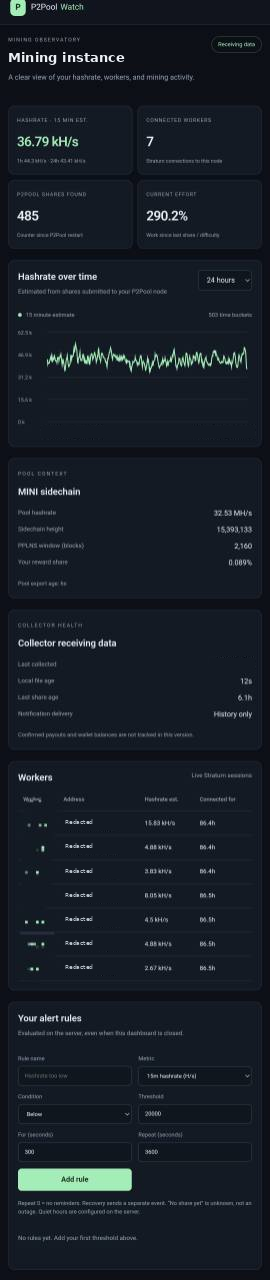
The web alpha opens with a 15-minute hashrate estimate, connected worker count, P2Pool shares found and current mining effort. The hashrate chart puts the latest reading in context. Below it, the Workers table shows active Stratum sessions, the age of each connection and an estimated hashrate for each worker. Stratum is the connection through which a miner receives jobs from P2Pool and submits its results.
If the total hashrate falls, start with the worker table. When a worker disappears, check the machine and its network connection. A worker with a shorter session than its peers may have recently reconnected. If all the sessions are still present, compare the chart with the individual estimates and check the affected miner's local logs. Our XMRig monitoring guide explains what to look for in those logs.
The pool section shows the Mini sidechain in this capture, including its hashrate, height, payout window and your estimated reward share. P2Pool uses Pay Per Last N Shares (PPLNS) to decide which mining work qualifies for a payout when the sidechain finds a Monero block. A sidechain share can count toward a payout while it remains eligible in that window. The dashboard's reward percentage is an estimate based on the window. Confirmed payouts and wallet balances are outside the scope of the web alpha shown here. The Monero documentation on P2Pool explains how shares enter and leave the window.
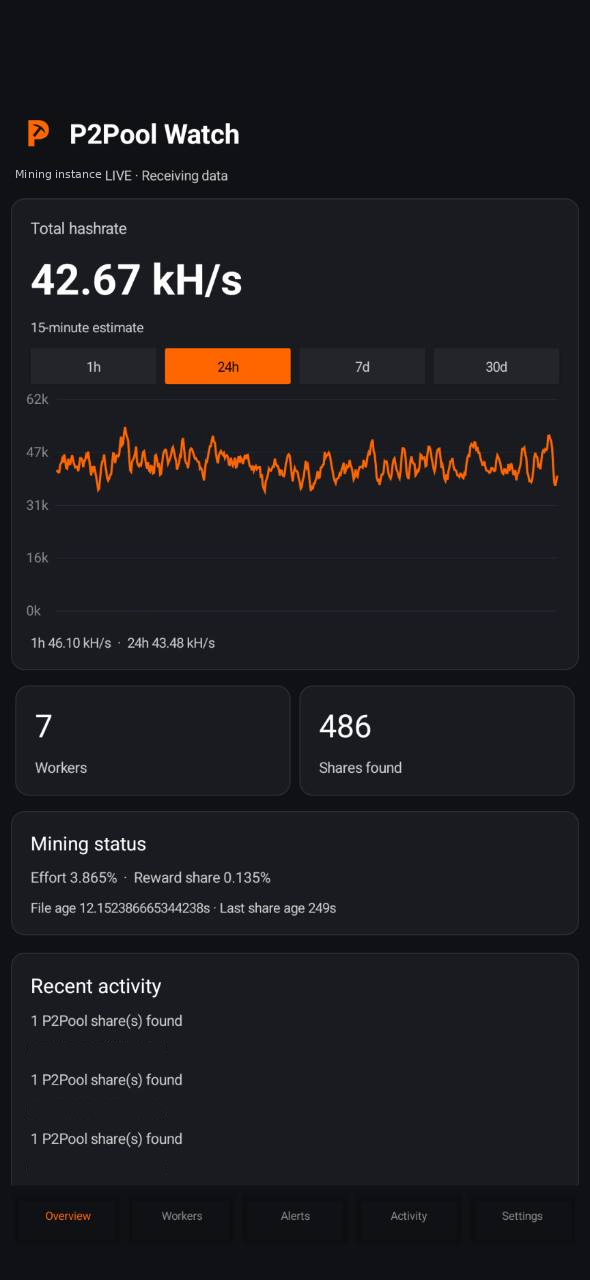
The Android overview uses orange for the selected chart range and the hashrate trace. It offers one-hour, 24-hour, seven-day and 30-day views. In the alpha capture, the overview shows 42.67 kH/s as the 15-minute estimate, seven workers and 486 shares found. Below the chart, the app shows mining effort, data age and recent share discoveries.
Use Overview for totals and Workers for individual miners. Alerts and Activity cover monitoring alerts and recent mining events. The fifth tab holds Settings. The activity feed gives you a quick way to check whether the reported share count has moved since your last look.
A short-window estimate can swing as miners submit shares at uneven intervals. Mining effort can also climb above 100% during routine operation. It means the work since the last share exceeded the statistical expectation for finding one. In the web capture, effort is 290.2% with 485 shares found. In the Android capture, the count is 486 and effort is 3.865%. Both captures show seven connected workers.
A longer hashrate view gives you a baseline when you change a RandomX setting or suspect a machine is running hot. Compare similar periods before and after a change, especially if you've changed thread counts or enabled huge pages. Our Linux guide to XMRig and P2Pool walks through measuring the starting point and checking huge-page allocation.
Pick a metric and threshold for each rule. You can set how long the condition must hold before it triggers, and how often the rule repeats. The server evaluates rules even after you close the dashboard. A duration is useful for a hashrate rule because a brief dip in the 15-minute estimate can resolve on its own. Alert history is visible in the alpha. Android push delivery remains in development.
Check collector health before interpreting a flat chart. The dashboard shows the last collection time, local file age and time since the most recent share. If file age keeps climbing while the chart stays flat, check the collector first. If the file is still fresh and only the last-share timer is climbing, the wait for the next share may explain the gap. Our P2Pool monitoring guide explains how to check those readings against local P2Pool data.
The web dashboard and Android app are both in alpha testing. P2Pool Watch is an independent project and is currently unavailable to the public. The interfaces and configuration may change before release. The project plans to share installation instructions and supported platforms when the public release is ready. There is no announced release date.