Monero / Wallets
Why Can't I Spend My Monero Balance?
Understand total and spendable Monero balances, confirmation locks, mining rewards, and why change can temporarily lock your XMR after a payment.
Your Monero wallet can recognize a payment before the network allows you to spend it. It can also show temporarily unavailable change after you send money. The remaining XMR still belongs to you.
To see what you can send now, check the spendable or unlocked figure and make sure the wallet has finished synchronizing.
Total balance and spendable balance
A wallet tracks your transaction outputs, the pieces of received value that later transactions can spend. Your balance is their sum.
The official CLI wallet guide calls the available amount the unlocked balance. Feather uses spendable balance and shows the balance for the selected account. Its unconfirmed balance includes both payments still outside the blockchain and outputs already confirmed but still locked. A confirmed payment can remain in a category with that name. Feather's balance documentation.
| Figure | What it tells you |
|---|---|
| Total balance | Funds the wallet currently counts, including locked funds |
| Spendable or unlocked balance | Funds currently eligible for spending, subject to the wallet's other restrictions |
| Amount available for a payment | What remains for the recipient after covering the transaction fee |
Labels and exclusions vary. Feather removes manually frozen outputs from its displayed balances. Freezing is a wallet choice, separate from the network's confirmation lock. Do not unfreeze an output without remembering why you excluded it.
Confirmed does not yet mean spendable
Ordinary transaction outputs must reach the network's minimum spendable age of 10 blocks. Monero's current consensus constants and input-validation code enforce that rule. The wallet's confirmation display is the practical way to follow progress.
Monero targets roughly two minutes per block, giving an estimated wait of around 20 minutes. Blocks arrive irregularly, and an unconfirmed transaction must first enter a block. An offline or lagging wallet may also take longer to display the updated state. The confirmation count is more useful than a wall-clock deadline.
Waiting does not require a second payment or an unlocking service. Changing your node cannot make a valid network lock disappear, although reconnecting to a working node can let a stalled wallet catch up. Our remote-node connection guide explains that connection.
Why sending a small amount can lock a larger balance
Suppose your wallet has one unlocked 5 XMR output. You send 1 XMR with an illustrative fee of 0.0001 XMR. The wallet spends the whole 5 XMR output. The new transaction creates 1 XMR for the recipient and 3.9999 XMR of change for you. The fee accounts for the remaining 0.0001 XMR.
| Part of the example | XMR |
|---|---|
| Original output spent | 5 |
| Recipient receives | 1 |
| Illustrative fee | 0.0001 |
| Change returned to your wallet | 3.9999 |
The 3.9999 XMR change is a new output, so it has a new confirmation lock. If you had no other outputs, your spendable balance can temporarily fall to zero even though you still own the change. The fee here demonstrates the arithmetic, not a current fee quote. Review the amount your wallet proposes before sending.
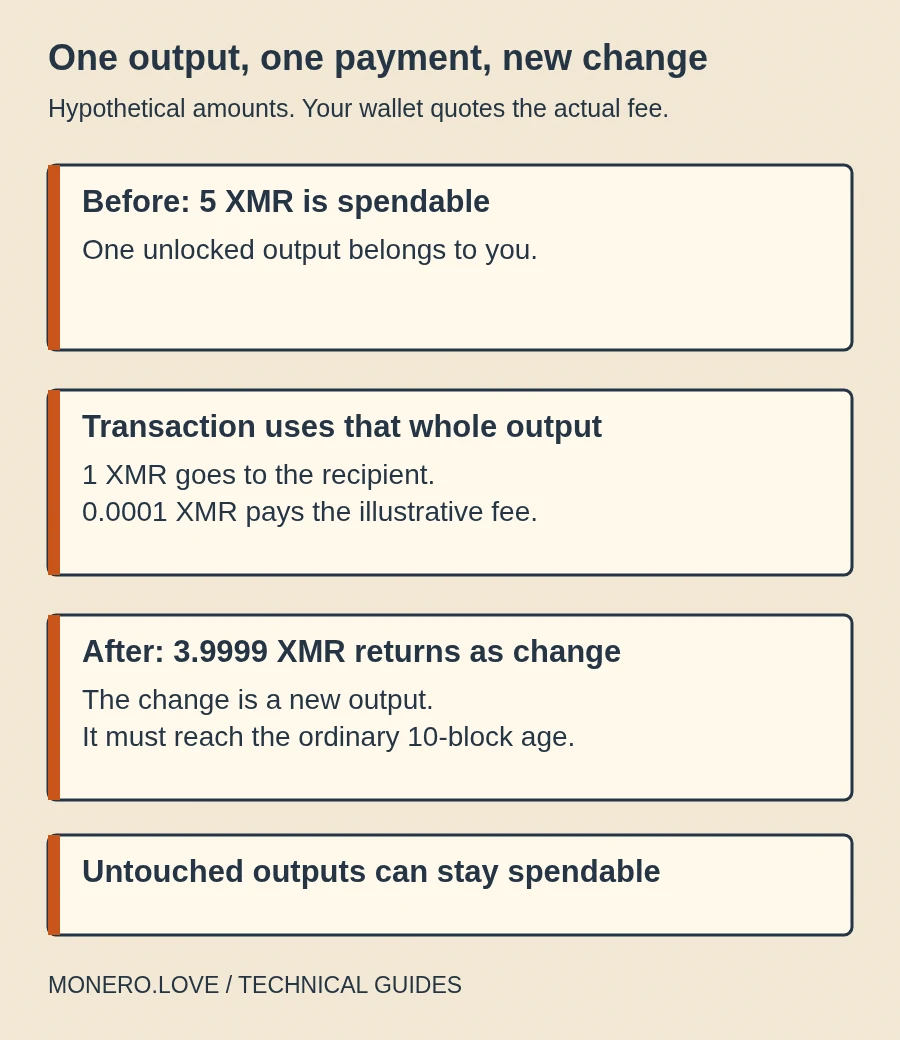
If you also owned a separate unlocked 2 XMR output and the transaction did not use it, that output could remain spendable. The selection of outputs determines how much change needs to unlock. The wallet's selection and unlock logic operates on individual outputs.
Mining rewards wait longer
A block's miner transaction, also called its coinbase transaction, creates a reward with a 60-block maturity rule. This is different from the ordinary 10-block age rule. At the target interval, 60 blocks take roughly two hours. Actual block times vary. The miner-transaction validation checks its unlock height.
A payout you receive from a mining pool is not automatically a coinbase output. Some arrangements pay miners directly in the block reward, while a conventional pool can send an ordinary wallet transaction later. Identify the kind of payment before applying the longer wait. The P2Pool guide explains direct miner payouts.
When waiting is not the whole answer
Check the wallet's synchronization status first. A restored wallet needs to scan the relevant history. An incorrect restore height can omit earlier receipts and produce an incomplete balance. The official restoration guide explains why the scan must start no later than your first payment.
Next, check the selected account and any frozen outputs. Funds visible in another account may not be available to a payment from the current account. A view-only wallet can identify incoming funds but lacks the private spend key needed to authorize a payment. A hardware wallet may require the device to connect and approve it. These are different conditions from a confirmation lock.
For a pending outgoing transaction, inspect its status before creating a replacement. A transaction missing from one node's pool is not proof it has disappeared everywhere. If the wallet reports a failure or inconsistent state, use its documented recovery procedure and preserve your wallet backup and signing setup. Never enter your seed into a website offering to unlock a balance.
Should you split outputs in advance?
Two or more independently spendable outputs can make repeated payments easier. Spending one need not lock all the others. Feather documents splitting an output in a self-transfer. You must start with spendable funds.
A self-transfer costs a transaction fee and creates new outputs that must unlock. It also adds a transaction to your history. More outputs and later combinations can alter observable transaction structure and give a counterparty more information to reason about. Splitting is not an automatic privacy improvement. Monero's subaddress caveats warn about combining funds and sender knowledge.
For occasional payments, simply allowing the change to unlock may be enough. If you need frequent payments, learn your wallet's output controls using modest amounts and review the fee before confirming. Choose the output count for your payment needs and privacy goals.