Privacy
Upgrade Qubes Fedora Templates from Fedora 43 to 44
Replace Fedora 43 templates in Qubes OS, preserve customizations, switch App Qubes and disposable templates, and check dependencies before removal.
Fedora 43 templates in Qubes OS are scheduled to reach end of life on December 9, 2026. Qubes recommends installing a fresh Fedora 44 template. Recreate the customizations you still need before switching dependent qubes to it. Keeping the old template until those checks are complete gives you a way back if an application fails.
This guide follows that replacement route on Qubes OS 4.3, for which Fedora 44 templates are available. We checked the deadline and template availability on November 8, 2026. Consult the Qubes Fedora 43 end-of-life announcement before starting, since schedules can change.
We checked the commands below against Qubes documentation, but have not run them on a Qubes installation for this guide. Every command block identifies where it runs.
Qubes also documents an advanced in-place upgrade, which preserves template customizations. That procedure has its own package and storage steps. Follow it as a complete alternative if you choose it, rather than mixing its commands into the fresh-template route below.
What changes when you replace a template
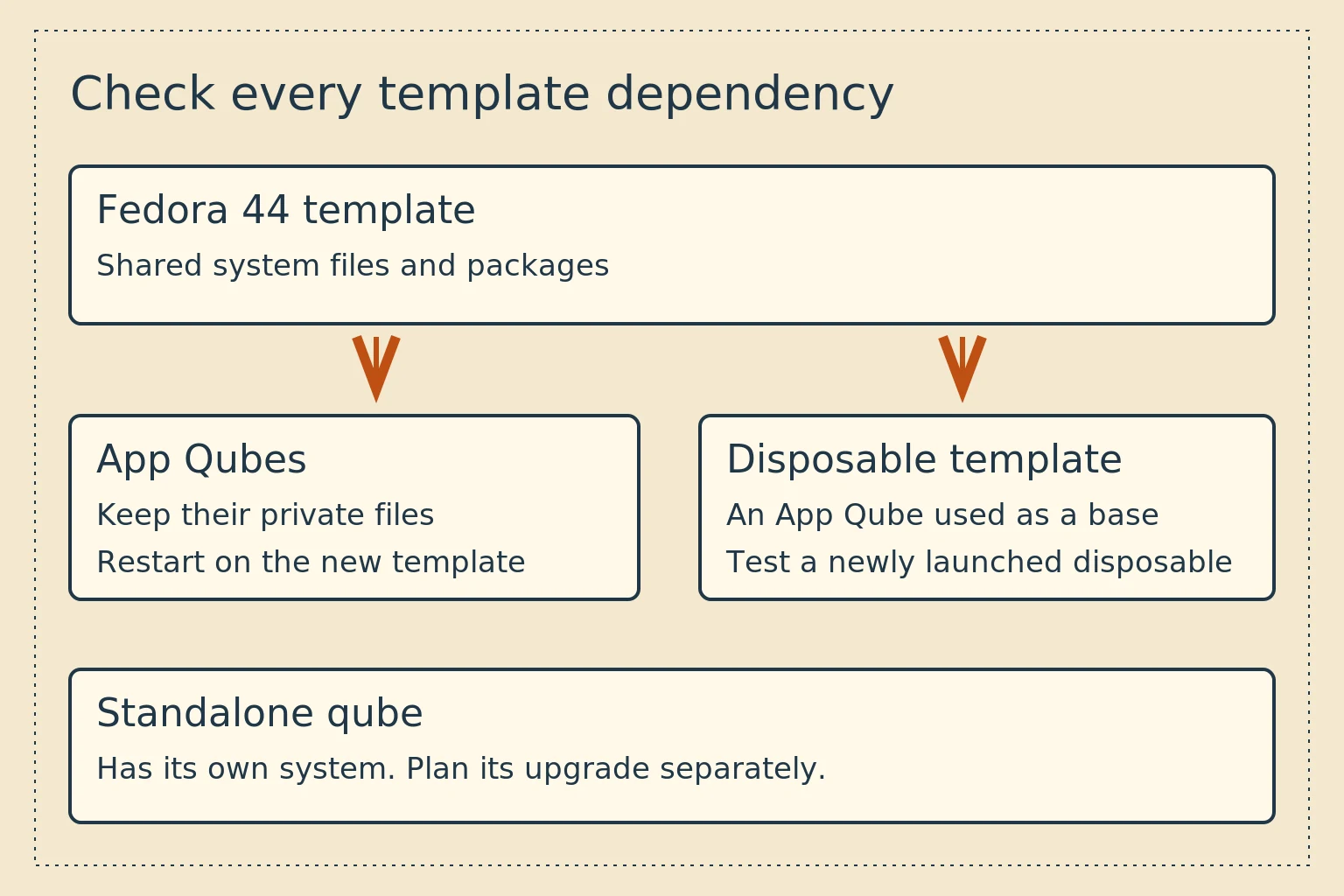
A Fedora template supplies the operating system and shared applications for its App Qubes. In a standard App Qube, personal files remain in its own home directory while the template supplies system files. Changing its template changes that system base. It does not mean copying your documents into the template.
A disposable template is an App Qube configured to provide the starting state for disposables. Check both relationships: the Fedora template underneath that App Qube, and the qubes or global settings that select it for disposable use. A disposable created before a change does not turn into a new environment while it is running.
A standalone qube has its own system installation. Replacing a shared Fedora template will not upgrade it. Inventory Fedora standalones separately and plan their migration or supported in-place upgrade before the same EOL deadline. Qubes explains these distinctions in its template documentation, disposable guide, and standalone documentation.
For a fresh standalone migration, create a new standalone based on the supported Fedora 44 template using Qubes' documented creation process. Reinstall its needed software and transfer only the data and settings you intend to keep. Test it before removing the original. Changing an App Qube's Template setting, as described later, does not apply to a standalone.
If these terms are new, start with our introduction to Tails, Whonix, and Qubes.
Back up the qubes and record their dependencies
Use Qubes' backup tool to back up the old template, affected App Qubes, disposable templates with useful customizations, and any Fedora standalone you intend to change. Store the encrypted backup on a separate device or destination you control. Check the selected-qube list before proceeding.
Use the restore tool's Verify backup integrity, do not restore the data option to check the backup. An integrity check is useful, but a separate practice restore provides stronger evidence that your recovery process works. Keep the backup passphrase available outside the computer. Saving the backup profile can save that passphrase in plaintext in dom0, so read the relevant option before enabling it. Qubes backup and restoration instructions.
Open Qube Manager and note each Fedora 43 template, its dependent qubes, and whether any provide networking or USB access. Record their current template assignments. Also check Qubes Global Settings for the default template and disposable choices.
In a dom0 terminal, these read-only commands provide an inventory:
qvm-template list --installed
qvm-ls --fields NAME,CLASS,TEMPLATE
The second command displays names, qube classes, and template assignments. Inspect custom-named templates too. A name such as work-base does not tell you its Fedora release. The available fields are documented in qvm-ls.
In each old Fedora template's terminal, check its release and package history:
cat /etc/fedora-release
dnf history
Record deliberately installed packages, enabled repositories, fonts, system services, and changes under /etc. Package history records package-manager actions. Files you edited manually will need separate notes. Keep those notes private if they contain internal hostnames or configuration details.
For a wallet qube, identify the actual wallet executable and data location. A downloaded wallet in the App Qube's home directory is not necessarily supplied by the Fedora template. Back up wallet recovery information through the wallet's own process, without copying seeds into the shared template or this inventory.
Install and update Fedora 44
The Fedora 44 template announcement lists Xfce, GNOME, and minimal variants for Qubes 4.3. Minimal templates require more manual setup. For an ordinary migration, choose the desktop variant that matches the environment you intend to maintain.
Fedora 44 uses the explicit GNOME name fedora-44-gnome. Do not assume that an older fedora-43 name translates to fedora-44 without a suffix. See the current Fedora template naming.
Use Qubes Template Manager to select and install the new template. To use the command line, in dom0, list the available templates and install the Xfce variant:
qvm-template list --available
qvm-template install fedora-44-xfce
For GNOME, choose fedora-44-gnome instead. These examples use standard repositories. An unavailable template is a reason to check the host release and repositories, not to enable testing repositories blindly.
Run Qubes Update, select the newly installed template, and let it finish. Shut down the template afterward. Qubes recommends its updater instead of direct dnf update commands, which bypass Qubes update protections. Installing a package is a separate operation. Qubes update instructions.
Recreate the customizations you still need
Open a terminal in the new Fedora 44 template to install packages that belong in its shared system. Use the package name from your inventory:
sudo dnf install PACKAGE_NAME
Replace PACKAGE_NAME with a real package from your inventory. Check whether it exists in Fedora 44 and whether its name or configuration changed. Review each proposed package transaction before accepting it.
Reapply relevant configuration changes individually. Copying the old template's /etc over the new one can overwrite current defaults and package configuration. Re-enable third-party repositories only after checking that their maintainers support Fedora 44.
Preserve the separation between templates with different trust requirements. Review customizations for each replacement independently.
Shut down the new template when its configuration is ready. Dependent App Qubes use the changed system files after they restart.
Switch one ordinary App Qube and test it
Choose a noncritical App Qube first. Save its work and shut it down. In its Qube Settings, change Template to the new Fedora 44 template, then start it again.
Check that your files are present, needed applications launch, networking works as intended, and any printing, audio, or device access you use still works. Check shortcuts for downloaded applications too. An old launcher can continue opening an old wallet binary even when the template has changed.
If something fails, record the error and stop that qube before changing its template back. The old template offers a recovery option for the system base, but it does not undo changes an application has made to data in the App Qube's home directory. Restore affected data from your backup if a new application format prevents rollback.
After a successful test, switch other dependent App Qubes in manageable groups. Handle network and USB service qubes deliberately. Stopping a network qube can interrupt other qubes' connections, and stopping a USB qube can affect attached devices. Do not experiment with your only working input device during an unrelated application test.
Check disposable templates and global defaults
Switch each Fedora 43-based disposable template to Fedora 44 through its Qube Settings after shutting it down. Then launch a new disposable from it and test the applications and file-opening behavior you use.
If you retained the same disposable template name, its users may already point to the right App Qube. If you created a replacement with a different name, update both global and per-qube disposable choices. Close old disposable instances after saving any files you need to keep.
In Qubes Global Settings → Qube Defaults, select the Fedora template for newly created qubes. Existing App Qubes keep their individual template assignments. Review the inventory again rather than relying on the default alone. Qubes instructions for switching templates.
Remove Fedora 43 only after verification
Run the inventory commands again in dom0. Confirm that no App Qube or disposable template still depends on the old template, that global defaults have been updated, and that the replacement has passed your normal workloads. Check Fedora standalones separately.
Keep the old template stopped while you finish testing. Once the migration and backup are verified, remove the exact old template through Qube Manager or in dom0:
qvm-template remove OLD_TEMPLATE_NAME
Use the installed name from your inventory. Removal deletes that template. If Qubes reports remaining dependencies, resolve them rather than forcing deletion. Do not remove App Qubes merely because they still have an old template assigned. Official template removal instructions.
Dom0 updates are a separate task
The Fedora 43 EOL announcement explicitly says it does not require changing dom0's underlying Fedora release. Do not run a Fedora distribution upgrade in dom0 to match your templates.
Continue normal Qubes host updates and follow applicable security bulletins. Our Qubes Xen advisory coverage explains an example that requires a host reboot. Template replacement, host patching, and updates to a separately installed wallet each have their own completion checks.
For systems also running Whonix, the companion Whonix and wallet update guide separates those update paths. A Fedora template migration does not update a Whonix template.